
Why CapCut Templates Are Not Loading (Easy Fix Guide)
You open CapCut, excited to use a trending template for your next viral video—but suddenly, nothing appears. No templates, no trending edits, just a blank screen. This issue has become quite common among creators, especially those making content for TikTok and Reels. The problem that the CapCut templates not showing can interrupt your workflow and cost you valuable time, but the good news is that it’s usually easy to fix.
In this guide, you’ll learn why templates disappear, what causes the issue, and how to fix it step by step so you can get back to editing without stress.
Why CapCut Templates Are Not Showing
Before jumping into fixes, it’s important to understand the reasons behind this issue. When you know the cause, solving the problem becomes much easier.
1. Internet Connection Issues
Templates in CapCut are cloud-based, meaning they require a stable internet connection to load properly. If your connection is weak or unstable, the templates section may appear empty.
2. Regional Restrictions
In some regions, CapCut templates may not be fully accessible due to restrictions. This is one of the most overlooked causes when templates fail to appear.
3. Outdated App Version
Using an older version of CapCut can lead to missing features, including templates. Updates often fix bugs and restore missing content.
4. Cache or App Data Problems
Over time, corrupted cache files can interfere with how the app loads content, including templates.
5. Server-Side Issues
Sometimes the problem isn’t on your side. CapCut servers may be temporarily down or overloaded, preventing templates from loading.
This issue can also be related to a CapCut login problem, which can prevent templates from loading properly.
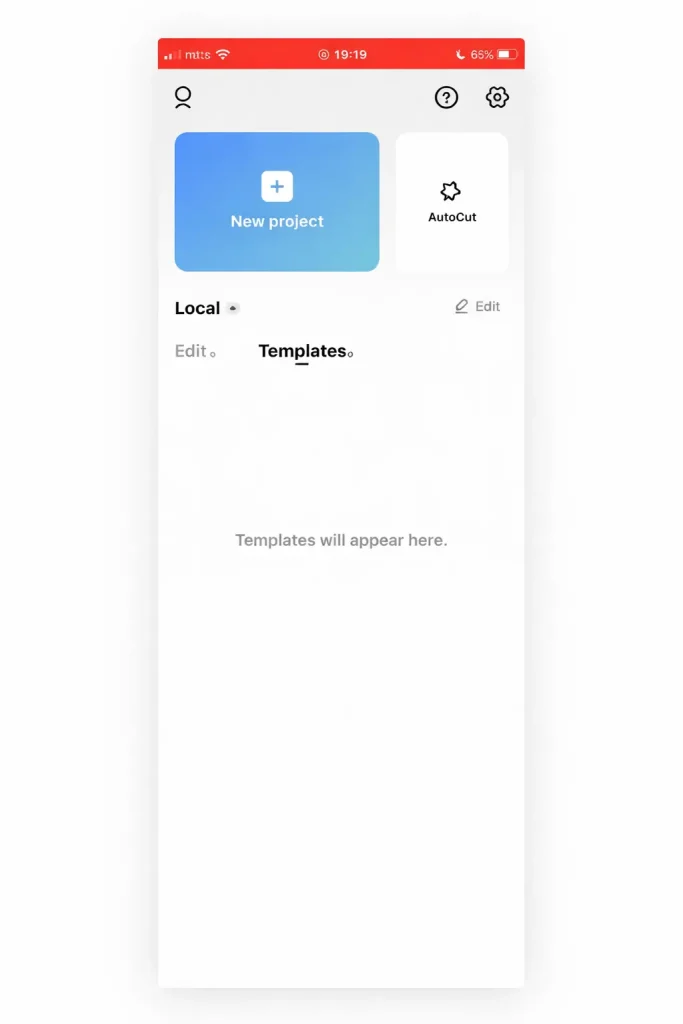
How to Fix CapCut Templates Not Showing?
Here are proven solutions that work for most users facing this issue.
1. Check Your Internet Connection
Start with the basics. A slow or unstable connection can prevent templates from loading.
Try this:
- Switch between Wi-Fi and mobile data
- Restart your router
- Turn airplane mode on and off
2. Restart the App
Sometimes the app just needs a fresh start.
Steps:
- Close CapCut completely
- Remove it from recent apps
- Reopen and check templates
3. Update the CapCut App
An outdated app version is a common cause of missing templates.
Update from:
- Google Play Store
- Apple App Store
After updating, reopen the app and check if templates are visible.
4. Clear Cache and App Data
Clearing the cache helps remove corrupted files.
For Android:
- Go to Settings
- Open Apps
- Select CapCut
- Tap Storage
- Click Clear Cache
5. Disable VPN
Using a VPN can sometimes block or hide template content.
- Turn off VPN
- Restart CapCut
- Check templates again
6. Reinstall CapCut
If nothing works, reinstalling the app can fix deeper issues.
Steps:
- Uninstall CapCut
- Restart your device
- Install the latest version
- Log in again
7. Switch Account or Login Method
Sometimes templates don’t load due to account-related issues.
Try logging in with:
- TikTok
How to Prevent Template Issues in CapCut?
To avoid facing the same issue again, follow these tips.
Keep the App Updated
Always install updates to avoid bugs and missing features.
Use a stable Internet
Templates rely on online servers, so a strong connection is important.
Avoid Modded Versions
Using unofficial or modded versions of CapCut may block template access.
Regularly Clear Cache
This helps keep the app running smoothly.
CapCut Templates Not Showing on PC (solution)
If you are using CapCut Desktop, templates may not appear due to:
- Limited feature availability
- Server sync issues
- Outdated desktop version
Solution:
- Update the desktop app
- Log in properly
- Use the mobile version for full template access
Why Templates Are Important for Creators
Templates are one of the biggest reasons why CapCut is popular. They allow creators to:
- Edit videos quickly
- Follow trending styles
- Create viral content
- Save time on manual editing
Without templates, creating engaging videos becomes more difficult, especially for beginners.
Conclusion
The “CapCut templates not showing” can be frustrating, especially when you want to create trending content quickly. However, in most cases, the problem is caused by simple factors like internet connectivity, outdated apps, or cache issues. By following the solutions shared in this guide—such as updating the app, clearing cache, disabling VPN, or reinstalling—you can restore templates in just a few minutes.
CapCut remains one of the best video editing apps for creators, and once this issue is resolved, you can continue creating engaging, viral content without interruption.
FAQs
1. Can I use CapCut templates offline?
No, CapCut templates require an active internet connection because they are stored on cloud servers. You can edit downloaded videos offline, but you won’t be able to browse or apply new templates without internet access.
2. Can VPN cause CapCut templates not to appear?
Yes, using a VPN can sometimes block or hide templates. CapCut may restrict certain content based on region, and VPN servers can interfere with this system. If templates are not showing, try disabling your VPN and reopening the app to check if the issue is resolved.
3. Do CapCut templates require an account to work?
Yes, most templates in CapCut require you to be logged in. While basic editing features can work without an account, templates are cloud-based and need proper authentication. Without logging in, you may see limited or no templates available in the app.
4. How can I fix CapCut templates not opening from TikTok?
If templates are not opening through TikTok, make sure both apps are updated and properly linked. Clearing the cache for both apps and restarting your device can also help. If the issue continues, reinstalling both apps often resolves the problem.