Is CapCut Safe to Use? Privacy & Data Security Explained (2026)
CapCut is one of the most popular free video editing apps right now. Millions of creators use it daily, but many still hesitate before installing it. Is CapCut safe to use, or are there hidden privacy risks you should know about? In this guide, we’ll look at real facts — ownership, data collection, permissions, and practical safety — so you can decide with clarity instead of guesswork.
Introduction
CapCut is one of the most downloaded video editing apps in the world. It’s free, beginner-friendly, and packed with templates that make short-form content easy to create. But as the app grows, so does the concern around privacy and data security. A lot of users keep asking the same thing: Is CapCut safe to use?
Instead of speculation, let’s look at this from a factual and balanced angle — ownership, data collection, permissions, PC safety, and realistic risks.
Who Owns CapCut and Why It Matters?
CapCut is developed by ByteDance, the same company behind TikTok.
ByteDance is a global tech company with millions of users across different platforms. Because TikTok has faced regulatory scrutiny in the United States and parts of Europe over data handling practices, people naturally question other ByteDance products too.
It’s important to separate political debate from technical safety. Regulatory scrutiny does not automatically mean an app contains malware or is unsafe to install. It usually relates to how user data is collected, stored, and potentially accessed.
So when people ask, “Is CapCut safe to use?” they’re often really asking about privacy and data policies rather than device security.
What Data Does CapCut Collect?
According to public privacy disclosures and app store data safety sections, CapCut may collect:
- Device information (model, OS version, device identifiers)
- Usage data (features used, crash logs, interaction patterns)
- Approximate location (based on IP address)
- Account information (if you sign up or log in)
- User-generated content stored in the cloud
This level of data collection is not unusual for free apps. Many popular social media and editing tools collect similar categories of data for analytics, performance monitoring, and personalization.
If you use CapCut without creating an account and avoiding cloud features, the amount of data tied directly to your identity is reduced. Most editing features work locally on your device.
Does CapCut Access Your Videos?
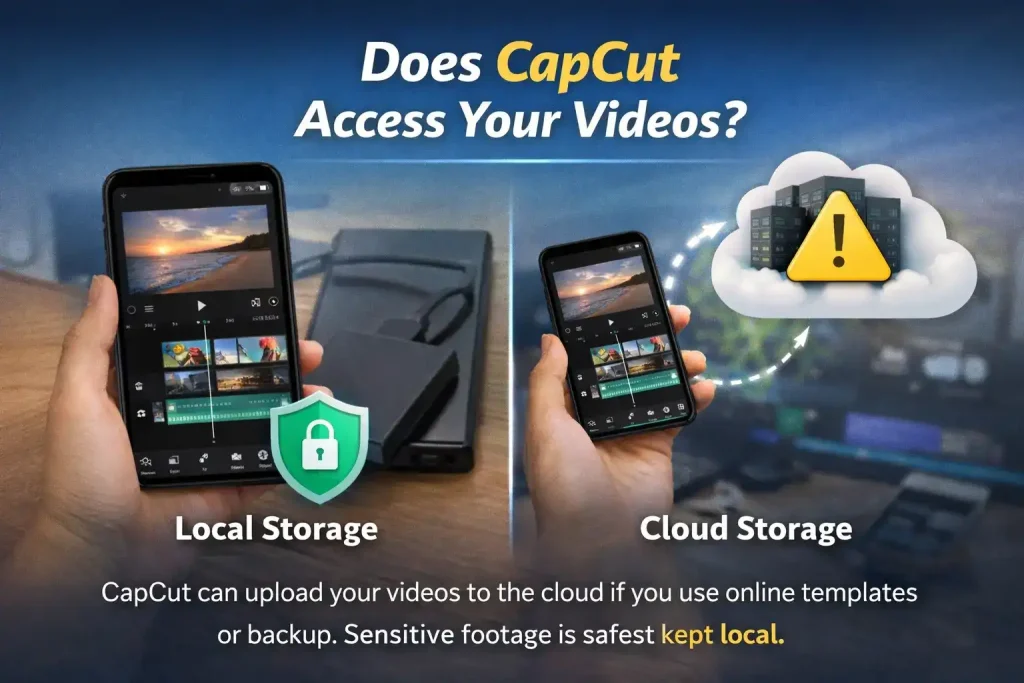
CapCut needs access to your media storage to import and export videos. That’s standard behavior for any editing app. The app does not publicly claim ownership of your content simply by editing it.
However, if you use cloud backup or online templates, your content may be uploaded to remote servers. That’s where privacy concerns typically arise — not because your videos are being stolen, but because they are stored externally.
If you are working with sensitive client projects, business material, or private footage, it may be safer to disable cloud syncing and keep everything local.
App Permissions Explained
On mobile devices, CapCut may request:
- Storage access
- Camera access
- Microphone access
- Internet access
These permissions are expected for a video editor. A camera and a microphone are required for recording features. Storage is needed to save and export files. Internet access powers templates, effects downloads, and cloud sync.
You can manually adjust permissions in your phone settings. If you don’t use in-app recording, you can disable camera and microphone access.
Being mindful of permissions is always a smart practice — not just for CapCut, but for any app.
Is CapCut Safe on PC?
The desktop version of CapCut is available for Windows and Mac. When downloaded from the official website or trusted app stores, it is generally considered safe to install.
The bigger risk comes from unofficial sources. Modified versions, cracked builds, or downloads from unknown third-party websites may contain malware. This isn’t specific to CapCut — it applies to almost any popular software.
If you’re wondering again, is CapCut safe to use on PC? The realistic answer is yes, as long as you download it from official sources and avoid pirated versions.
Data Storage and Cloud Concerns
When you enable cloud storage, your projects are saved on external servers. That introduces the same privacy trade-off seen with services like Google Drive or Dropbox. You gain convenience and cross-device syncing, but your data leaves your device.
ByteDance states that data storage practices vary depending on region and legal requirements. This has been part of broader global discussions around tech companies and data governance.
For most everyday users editing short videos, this level of risk is considered low. For professionals handling confidential client work, keeping files offline may be the better choice.
Is CapCut Safe for Children?
Because CapCut is connected to a social media ecosystem through TikTok, parents sometimes worry about younger users.
CapCut itself is primarily a video editing tool, not a social media platform. However, templates and trending features may be linked to TikTok trends. Supervision is still recommended for minors using any online-connected app.
From a technical security standpoint, there is no strong public evidence suggesting CapCut installs spyware or malicious software.
Security vs Privacy: Understanding the Difference
Many discussions mix up two different issues:
- Security risk: Does the app contain malware or damage your device?
- Privacy risk: Does the app collect and store user data?
There is no credible evidence showing that CapCut infects devices with viruses when downloaded from official sources. Privacy concerns relate more to data handling and corporate governance rather than hacking or malware. Understanding that difference helps answer the question more clearly.
Realistic Risk Assessment
So, is CapCut safe to use in practical terms?
For most users:
- It does not install malware
- It does not secretly damage devices
- It operates similarly to many other free creative apps
The main consideration is whether you are comfortable with a free app collecting usage data and offering cloud services under a large global tech company.
If you are privacy-sensitive:
- Disable cloud backup
- Limit permissions
- Avoid linking unnecessary accounts
- Download only from official sources
Those steps significantly reduce potential risk.
Common Myths About CapCut Safety
Myth 1: CapCut steals all your videos.
There is no verified public evidence supporting this claim. Cloud storage policies are disclosed in privacy documents.
Myth 2: CapCut installs spyware.
No credible cybersecurity reports confirm this when using official downloads.
Myth 3: It’s banned everywhere.
Regulatory discussions vary by country, but the app remains widely available in major app stores globally.
When Should You Avoid Using CapCut?
There are certain cases where you might reconsider:
- If you handle highly confidential corporate footage
- If your organization has strict data compliance rules
- If regional regulations restrict ByteDance products
In those scenarios, enterprise-focused editing software with contractual privacy guarantees may be more suitable. For everyday creators, influencers, and casual editors, the practical risk remains low.
Final Verdict
So let’s answer it clearly. Is CapCut safe to use?
From a device security perspective, yes — when downloaded from official sources. From a privacy perspective, it collects data similar to many free apps, and users should review permissions and cloud settings carefully.
Like most modern software, the safety level depends partly on how you use it. Smart downloading habits and privacy awareness go a long way. If your main goal is editing short videos for social media, CapCut remains one of the most widely used and generally trusted free tools available today.